Appointment Management Software for Beauty Centers
Make appointment management in your Beauty Center easy and efficient with a system that allows you to optimize your business resources.
Managing Appointments in a Beauty Center
A Beauty Center offers a wide range of services to its clients. These services may vary depending on the type of center and its specialization. Common services include:
- Facial treatments: cleansing, hydration, exfoliation, lifting, chemical peels, microdermabrasion, and facial massages.
- Body treatments: massages, anti-cellulite, toning, slimming, hair removal, mud therapy, and beauty treatments for hands and feet.
- Hair treatments: haircuts, styling, coloring, hair care treatments, shampoos, and conditioners for each hair type.
- Hair removal: waxing, threading, laser hair removal, electrolysis, and laser depilation.
- Nail treatments: manicure, pedicure, nail reconstruction, semi-permanent polish, and nail art.
- Advanced aesthetics: microinjections, fillers, Botox, laser therapy, and cryotherapy.
These treatments vary in duration and require different staff, rooms, and equipment. To optimize appointments and avoid overlaps or simultaneous use of equipment, it is essential to use appointment management software like Softvision Agenda. This ensures maximum utilization of scheduling slots without inconveniencing clients.
Clients often book months in advance. To prevent them from forgetting appointments, sending reminders via email or SMS is crucial. This task is fully automated by Softvision Agenda.
Self-booking by Beauty Center Clients
Using Softvision Agenda, staff can add appointments through the software control panel. This approach is typical for phone bookings and may require a dedicated secretary in medium-large centers.
Additionally, clients can book independently through a dedicated website (booking portal), selecting the treatment, date, and time. The system only shows available slots, automating the process and reducing staff workload.
Configuring Softvision Agenda for a Beauty Center
Let’s see how to configure Softvision Agenda for a Beauty Center after understanding typical appointment management challenges.
Defining Center Opening Hours
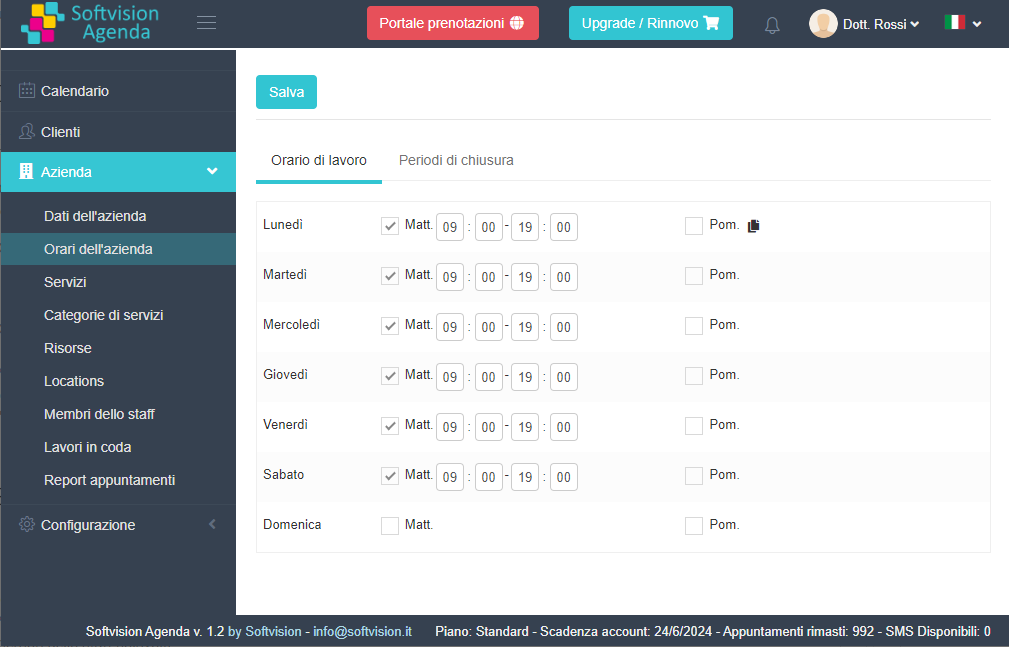
In the "Company" menu of the software panel at https://agapp.softvision.it, you can configure all system settings.
The essential step is defining working hours so the system only allows bookings when the center is open.
Using "Company Hours", you can set morning and afternoon schedules. In this example, the Beauty Center is open 9:00–19:00 daily except Sundays.
Resources and Services Offered by the Beauty Center
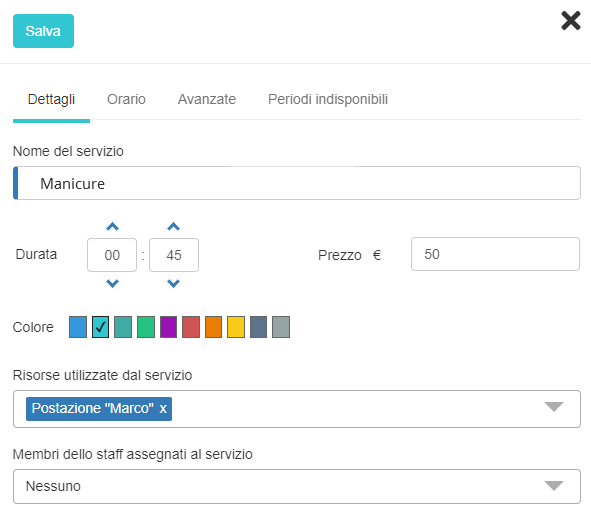
Next, define the treatments offered. Under "Services" in the "Company" menu, you can add or edit services.
Create each service with its duration (e.g., Manicure, Facial, Waxing). Assign the appropriate staff and resources depending on the center size. Two scenarios exist:
- Single-client center: create one resource (e.g., “Station”) with quantity “1” for all services.
- Multi-station center: assign a staff member to each station, create a resource for each, and assign all resources to every service with manual selection enabled. Clients can then choose their preferred staff during online booking.
If a staff member works on multiple stations simultaneously, configure their “capacity” accordingly and assign them to all services.