

Guide to using the Softvision Agenda Reseller Control Panel
The Reseller Area is both a technical and commercial tool that allows Resellers to create Softvision Agenda accounts for end customers and conveniently place orders on their behalf.
A very interesting feature is the ability to make purchases independently, at any time, without our intervention. By choosing online payments with credit card or Paypal, the system will automatically credit the purchased services (subscriptions and SMS).
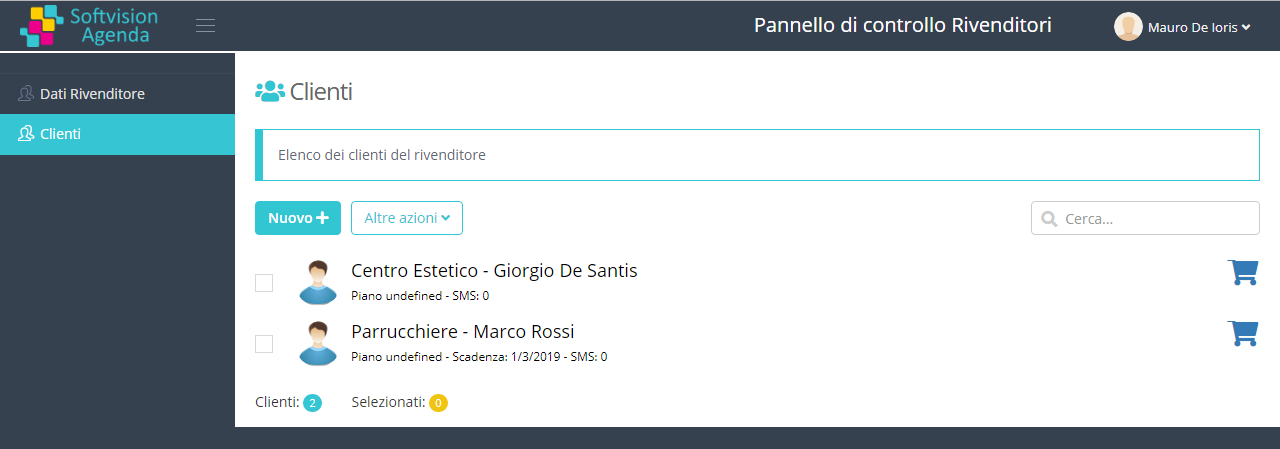
Management of reseller’s customers
Customer management in the control panel essentially allows two operations: creating a new customer and purchasing subscriptions and SMS.
To create a new customer, simply click the New button, enter the customer's complete details along with their email address and password for accessing the software.
In the customer list, to the right of each customer, there is a shopping cart icon that allows you to make purchases for that customer. During the purchase process, you will need to select the user's plan, the number of subscription months, and any SMS to purchase on behalf of the customer.
Branding (White Label)
Another very important aspect of the Softvision Agenda partner program is related to White Label (Branding), which allows you to insert your logo into our application.
To personalize the application, simply click on the Reseller Data menu and then on the Branding tab. On this page, you can insert your company logo and the web page address your customers will use to access the Softvision Agenda control panel. The yellow box also contains the HTML code that should be inserted on that page.