Appointment Management System for Dentists
Automate and streamline the management of your dental practice appointments with a system that significantly improves the quality of services offered to your patients.
Managing Appointments in a Dental Practice
The main activities of a dental practice include a wide range of dental services related to the care and health of teeth, mouth, and oral cavity. Here are some of the primary services provided in a dental practice:
- Dental Cleaning and Hygiene: Regular cleaning and hygiene services to remove plaque, tartar, and stains from teeth.
- Dental Fillings: Services to repair cavities or damaged teeth through fillings.
- Tooth Extractions: When a tooth is severely damaged or infected and cannot be repaired, extraction may be required.
- Root Canal Treatments: Required when infections or nerve damage occur inside a tooth.
- Dental Prosthetics: Services to replace missing teeth.
- Orthodontic Treatments: Services to correct alignment of teeth and jaws.
- Preventive Care: Promotion of oral health and prevention of dental diseases.
- Oral Surgery: In some cases, surgical interventions like dental implants may be necessary.
All the above services typically require advance booking.
Appointment management in a dental practice is crucial to ensure an efficient workflow and a good patient experience. A well-organized automated system can greatly simplify scheduling and reduce the risk of errors or overlaps.
Key aspects of appointment management in a dental practice:
- Booking System: Patients can book appointments conveniently via phone, online, or a combination. The goal is to simplify scheduling and minimize errors or overlaps.
- Appointment Calendar: Staff manage a calendar tracking all bookings, regularly updated to avoid conflicts. Access is provided for scheduling, editing, or canceling appointments.
- Time Management: Consider the duration needed for each treatment—cleaning, fillings, extractions, root canals, etc.—to avoid delays or overbooking.
- Appointment Confirmations: Reminders via calls, SMS, email, or automated confirmation systems.
- Agenda Optimization: Take into account treatment capacity and staff availability. Plan consecutive appointments to optimize resources and manage urgent cases efficiently.
All these requirements are excellently met by an appointment management software like Softvision Agenda.
Using and Configuring Softvision Agenda in a Dental Practice
Configuring the automatic scheduling system Softvision Agenda for a dental practice is complex due to the high number of services offered. Here’s how to proceed:
Defining the Dental Practice Hours
In the "Company" menu of the software control panel at https://agapp.softvision.it,
all configuration functions are available.
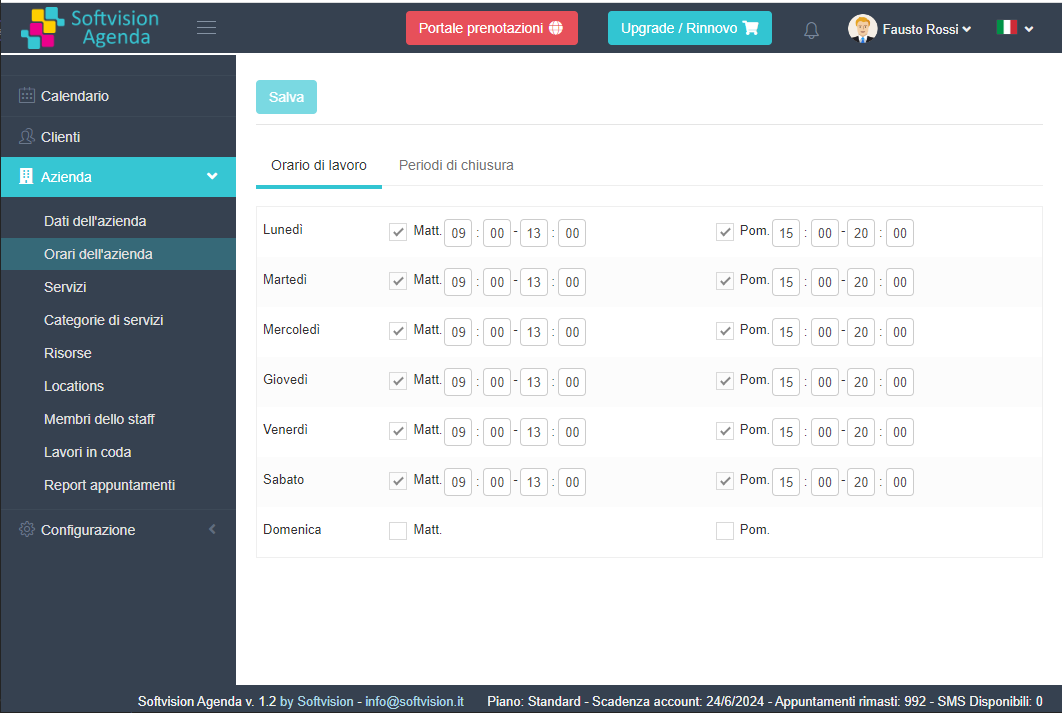
The first step is to define the office hours so the system only allows bookings during these times.
Using "Company Hours", you can set morning and afternoon hours for the whole week.
In this example, appointments are accepted from 9:00 to 13:00 and 15:00 to 20:00, every day except Sunday.
Defining Dental Services Offered
A dental practice can provide many types of services or appointments.
To organize the agenda properly, it’s essential to define exactly which services are provided, by whom, and which resources are used.
After specifying the operators (dentists, hygienists, etc.), the next step is defining all the resources in the practice needed for these services. Resources include treatment rooms, equipment, etc.
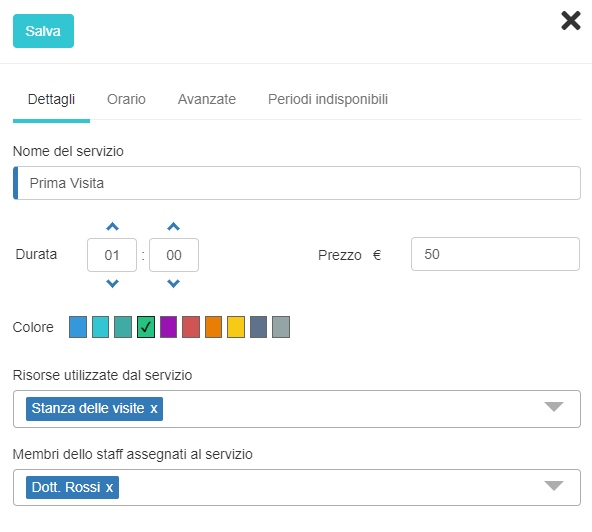
Finally, all types of services (Services) that the practice offers must be entered. For each service, specify the name, duration, resources used (e.g., room), and the dentist (staff member) providing the service.