Online Appointment Management System for Medical Practices
Simplify the management of appointments in your solo medical practice with a tool capable of improving your clinic's efficiency.

Appointment management in a medical practice
In a medical office, managing bookings is crucial. In solo practices, appointments are often made by phone by a receptionist or, in some cases, by the doctor. In both cases, it is important to maintain a well-organized calendar to avoid overlapping or incorrect bookings, preventing patient inconvenience.
An important aspect to consider is the duration of appointments. Identify the different types of visits offered: routine check-up, specialist visit, or follow-up. For each type, establish the average duration, e.g., 30 minutes for a routine visit, one hour for a specialist visit.
Some patients book months in advance. Sending reminders via email or SMS is essential to ensure they don’t forget appointments. Fortunately, this is automated by Softvision Agenda.
Finally, the doctor or receptionist should always be available to respond to changes or cancellations, ensuring a flexible and satisfactory appointment management system.
Self-booking by patients
Using Softvision Agenda, appointments can be added to the calendar by any staff member through the control panel. This approach is common for phone bookings requiring a receptionist.
Modern scheduling software also allows patients to book autonomously. Patients connect to a dedicated website
(booking portal),
select visit type, date, and time. The system automatically shows only available slots.
This greatly reduces administrative work and can even eliminate the need for a receptionist in some cases.
Using and configuring Softvision Agenda in a medical office
After understanding the challenges of appointment management, let's see how to configure Softvision Agenda for use in a medical office.
Defining the office hours
In the "Company" menu of the control panel (https://agapp.softvision.it), all system configuration functions are available.
First, define working hours, so the system allows bookings only when the office is open.
Clicking "Company Hours" sets morning and afternoon times for the week.
Example: Monday, Wednesday, Thursday mornings (9-13), Tuesday and Friday afternoons (14-18).

Services and resources in the medical office
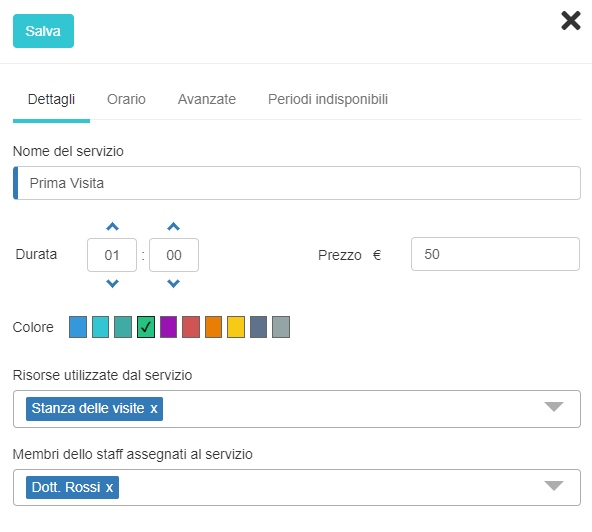
The most important step is defining the characteristics of the visits. Under "Services" in the "Company" menu, add or edit services.
Example: "First visit" (1 hour) and "Follow-up visit" (30 minutes).
Specify the "resources" used and staff involved. In a single-doctor office with one room, the resource is "Consultation room" and staff "Dr. Rossi".
Correctly entering durations and resources prevents overlapping appointments. For example, if a "First visit" is booked at 9 am (60 min), the system won't allow another booking for the same resource or staff until 10 am.