Appointment Management Software for Pharmacies
Automate the appointment management of your pharmacy with a system that significantly improves the services offered to your customers.

Managing Appointments in a Pharmacy
The main activity of pharmacies is the sale of medicines and over-the-counter health products. In recent years, however, pharmacies have expanded the services they provide.
Often pharmacies offer a wide range of services to their customers, such as:
- Blood pressure measurement: Many pharmacists can measure customers' blood pressure.
- Cholesterol testing: Some pharmacies offer cholesterol tests to help monitor heart health.
- Vaccine administration: Some pharmacies can administer vaccines to prevent diseases such as influenza.
- Health advice: Pharmacists may provide guidance on disease prevention, smoking cessation programs, diabetes management, and sexual health.
- Screening services: Some pharmacies offer health screenings, such as blood glucose and hemoglobin A1C testing for diabetes management.
- Mental health services: Some pharmacies offer support and counseling for patients with mental health conditions.
- Skin care services: Pharmacies may also provide skincare consultations and distribute skincare products.
Many of these services require an appointment and usually last only a few minutes.
For this reason, it is essential to use an appointment scheduling system like Softvision Agenda
to efficiently distribute appointments throughout the day.
Self-booking by Customers
Appointments can be entered into the Softvision Agenda calendar by any pharmacy employee via the software control panel. This method is often used when patients book appointments in person or by phone.
If the number of appointments is high (e.g., vaccinations), it may be necessary to assign a staff member almost exclusively to manual appointment entry.
Using the software, customers can also book their appointments completely independently, without any staff intervention.
Customers access a dedicated website (booking portal), select the type of service, date, and time. The system automatically displays only available time slots.
This feature greatly reduces workload in the pharmacy, fully automates the booking process, and eliminates the need for a dedicated appointment staff member.
Using and Configuring Softvision Agenda in a Pharmacy
Setting up the automatic booking system Softvision Agenda in a pharmacy is quite straightforward. Here's how:
Defining Pharmacy Hours
In the "Company" menu of the software control panel, available at https://agapp.softvision.it, all system configuration options are available.
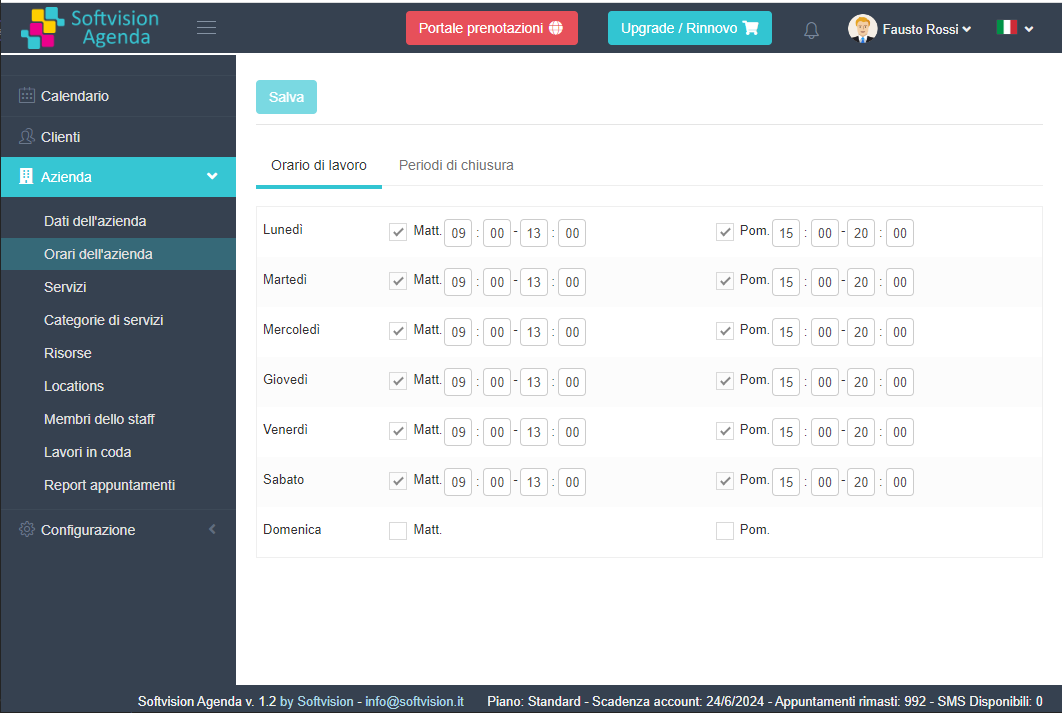
The first step is to set the pharmacy's opening hours. The system will only allow bookings during these times.
Using "Company Hours" you can define morning and afternoon hours for the entire week. In this example, the system accepts appointments from 9:00 to 13:00 and from 15:00 to 20:00, every day except Sunday.
Defining Offered Services
A pharmacy can provide numerous services or visits.
To properly organize the pharmacy schedule, it is essential to clearly define which services are offered,
who performs them, and which resources are required.
After defining staff (pharmacists, vaccinators, etc.), all necessary resources must be set, including rooms or equipment used for different services.
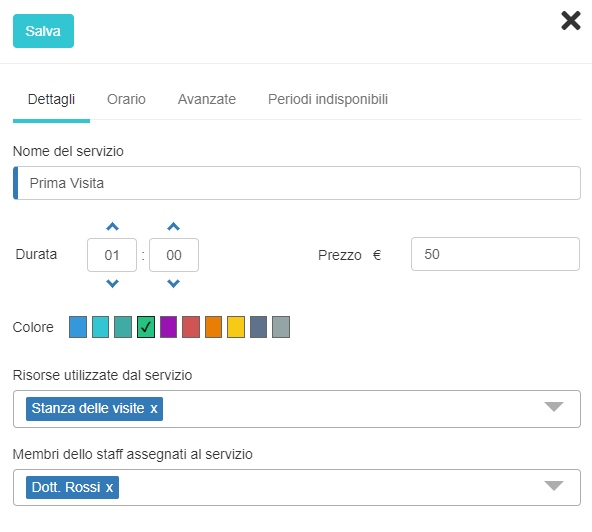
Then, all types of services (Services) should be entered, including name, duration, resources used, and the responsible staff member.
The same service may be performed by multiple staff members. In this case, all staff members are assigned to the service, and the option "Require staff member selection" is enabled, so customers can choose the staff member when booking online or when a booking is manually entered.