Free Table Reservation Software for Restaurants
Optimize table reservations in your restaurant using a centralized booking system that maximizes occupancy.
Managing Table Reservations in Restaurants and Pizzerias
Managing table reservations is crucial to ensure efficient service, satisfy customers, and maximize restaurant revenue. Common best practices include:
- Use a centralized booking system to record and track reservations, whether a diary, electronic calendar, or software like Softvision Agenda.
- Provide multiple booking channels: phone, email, or online via your restaurant website or third-party platforms like table reservation portal.
- Record essential reservation details: customer name, number of guests, date, time, and special requests (allergies, seating preference). Data can be used later for email/SMS marketing campaigns.
- Set an approximate duration per reservation to optimize table use, e.g., a two-hour slot per dinner.
- Send automatic confirmations or contact customers to verify details, reducing errors. This is handled automatically by Softvision Agenda.
- Ensure restaurant staff are aware of reservations, changes, and special requests to provide attentive service.
- Send reminders: use Softvision Agenda to automatically send reservation reminders via SMS and/or email.
Configuring Softvision Agenda for Table Reservations
Configuration is straightforward but requires attention.
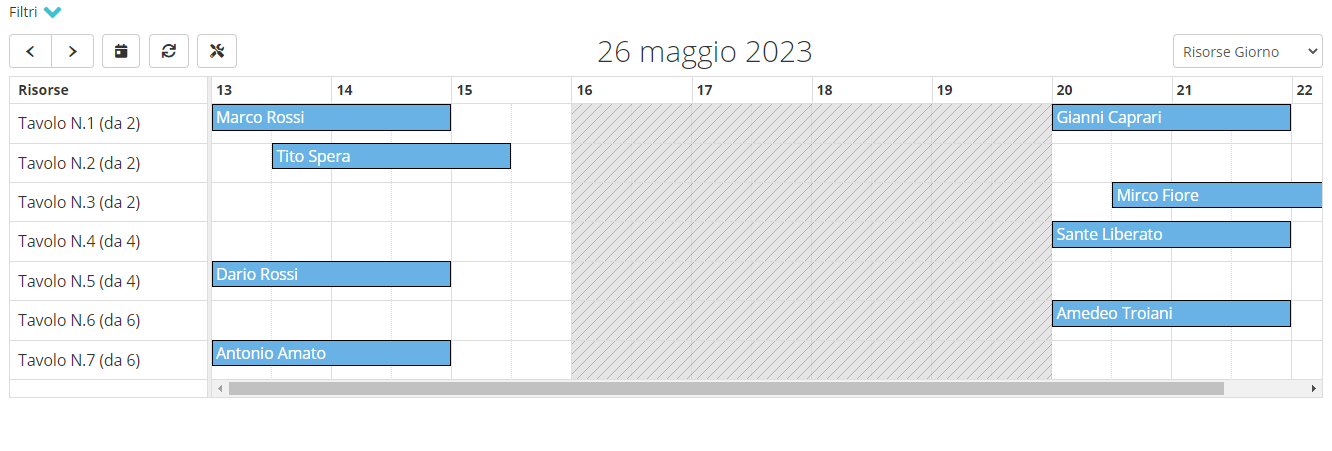
First, set restaurant opening hours. For a single shift, use 13-16 and 20-23. With one-hour services, this allows one reservation per table for lunch and dinner.
Next, configure Resources (Menu: Company | Resources). Create one resource per table. Example: if the restaurant has 3 tables for 2, 2 tables for 4, 2 tables for 6, 2 tables for 8, name resources as:
- Table 1 (2 seats)
- Table 2 (2 seats)
- Table 3 (2 seats)
- Table 4 (4 seats)
- Table 5 (4 seats)
- Table 6 (6 seats)
- Table 7 (6 seats)
- Table 8 (8 seats)
- Table 9 (8 seats)
- ....
Finally, create Services (Menu: Company | Services). Create one service per number of guests per reservation. Using the previous example:
- Reservation for 1 guest
- Reservation for 2 guests
- Reservation for 3 guests
- Reservation for 4 guests
- Reservation for 5 guests
- Reservation for 6 guests
- Reservation for 7 guests
- Reservation for 8 guests
- ...
Assign the relevant resources to each service. E.g., 1-2 person services use tables 1-3, 3-4 person services use tables 4-5. Enable "Automatic Resource Selection" so the system selects available tables automatically.