

Company Customers Management
Calendar appointments are, in most cases, associated with the respective customers who request them. For this reason, Softvision Agenda allows managing a complete customer profile for each company.
The Customers section of Softvision Agenda shows a list of all customers in the archive, each selectable with a specific flag. For the selected customers, it is possible to perform actions through the "Other actions" menu, such as exporting to Excel or sending SMS/Email messages. Note that to send emails, it is necessary to configure your SMTP server.
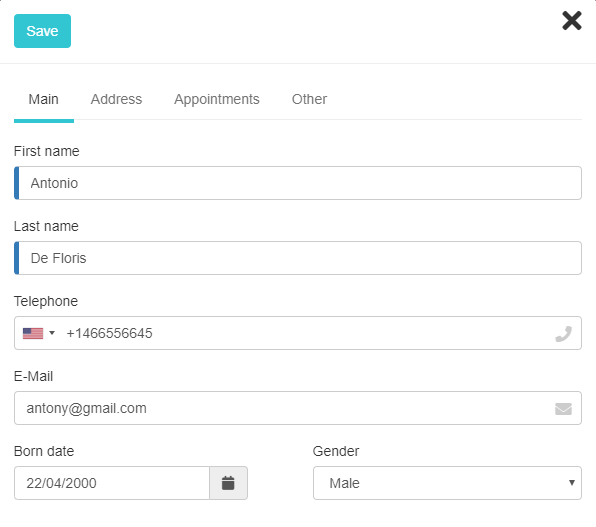
The window containing customer data is divided into four pages:
Main data and address
The first two pages contain the customer's main personal information along with contact details (phone and email). Including these is essential for SMS/Email marketing operations.
Appointments
This page lists all past and future appointments related to the customer.
Subscriptions
This page allows you to perform various operations on the subscriptions assigned to the customer. The section is available only if at least one subscription has been created via the Company | Subscriptions menu.
Other
The last page contains information regarding customer privacy: how SMS or Email messages are sent and consent for profiling.
The program manages three different types of messages:
- Anniversaries: messages sent on special occasions, such as the customer's birthday.
- Welcome: messages sent when a new customer registers.
- Promotions: messages sent from the page listing all customers.
Note that this section only records the customer's consent to receive these types of messages. To enable automatic sending, configure the program via the Preferences section. Profiling consent, also included in the preloaded privacy form, indicates whether the customer agrees to personal or aggregated data processing for profiling and market research purposes. If this checkbox is not checked, the customer's actions (appointments) will automatically be excluded from program statistical analyses and research.
Finally, at the bottom of this tab, you can manage the account for accessing the online booking portal. You can create a new account or recreate and send the password to a customer who already had an account but lost their credentials.